

How Code Context Solves the 'Save' Problem in App Translation
Why does 'Save' translate wrong? Without context, AI guesses. Learn how on-device code analysis improves translation accuracy for short UI strings.
The word "Save" has at least three correct Spanish translations: guardar (store something), ahorrar (save money), or salvar (rescue). An AI translation tool seeing only the word "Save" has no way to know which one you mean.
This is the context problem in app localization, and it affects short UI strings across every language pair. Without understanding where a string appears in your app, even the best translation models guess wrong.
Smart Context solves this by analyzing your source code on-device to identify string usage — turning ambiguous single words into correctly translated UI elements.
Why Short Strings Translate Poorly Without Context
Most localization errors come from the same category: short, common words that have multiple meanings.
Consider these strings from a typical iOS app:
| String | Button | Menu Item | Status |
|---|---|---|---|
| Save | guardar | guardar | guardado |
| Share | compartir | compartir | compartido |
| Post | publicar | publicación | publicado |
| Check | comprobar | cheque | verificado |
| Clear | borrar | claro | despejado |
The correct translation depends entirely on context that doesn't exist in the string itself.
Traditional translation workflows strip context when strings leave your Xcode project. A translator sees a spreadsheet row with "Save" — nothing more. They guess based on common usage, and for UI strings, they're often right. But when they're wrong, the error reaches production.
The cost of context loss
Context errors create problems at different stages:
- Subtle confusion — Users understand the app but notice awkward phrasing
- Functional confusion — Users hesitate at critical actions because the label doesn't match expectations
- Complete failure — Users can't complete tasks because terminology is wrong for their domain
For critical strings — payment confirmations, destructive actions, navigation labels — context errors directly impact conversion and retention.
How Code Context Analysis Works
Smart Context takes a different approach: instead of sending isolated strings to translation, it first analyzes your source code to understand how each string is used.
Source file scanning
When you import your Xcode project folder (not just the .xcstrings file), StringWise scans your Swift and Objective-C source files for string references. It identifies:
- UI element type — Is this string used in a
Button,Label,Alert,NavigationTitle, orMenu? - Surrounding code — What does the function do? What happens when this button is tapped?
- Variable naming — Does the variable name provide semantic hints (e.g.,
saveDocumentButtonvssaveMoneyLabel)?
Context enrichment
The analysis results enrich each string before translation:
Without context:
Source: "Save"
→ Translation request: Translate "Save" to Spanish
With Smart Context:
Source: "Save"
Context: Button in DocumentEditor, triggers saveToCloud() function
→ Translation request: Translate "Save" (button label for saving a document) to Spanish
The enriched request removes ambiguity. The translation model receives enough information to choose correctly between guardar, ahorrar, and salvar.
On-device processing
Smart Context runs entirely on your Mac using Apple's on-device language model framework. The code analysis happens locally:
- Source files are read from disk
- String references are identified and analyzed
- Context annotations are generated on-device
- Only string content (with context descriptions) is sent to translation APIs
Your source code never leaves your device. The translation service sees "Button label for saving a document" — not your actual Swift implementation.
Privacy Benefits of On-Device Processing
Many translation tools require uploading your project to cloud servers for analysis. This creates concerns:
- Intellectual property exposure — Your implementation details, algorithm names, and business logic become visible to third parties
- Compliance risk — Source code containing customer data patterns or security implementations shouldn't leave your control
- Vendor lock-in — Code uploaded to a translation platform becomes dependent on that service
StringWise's on-device approach eliminates these concerns:
| Aspect | Cloud-Based Tools | StringWise Smart Context |
|---|---|---|
| Source code location | Uploaded to vendor servers | Stays on your Mac |
| Analysis processing | Remote servers | Local (Apple Neural Engine) |
| Data sent to translation API | Often full context + code | String + context description only |
| Works offline | No | Context analysis: yes |
For teams with security requirements or apps handling sensitive domains (healthcare, finance, enterprise), on-device processing isn't a nice-to-have — it's a requirement.
Quality Comparison: With vs Without Context
The difference between context-aware and context-free translation is measurable. Here's how the same strings translate with and without Smart Context enabled:
Example 1: "Post"
| Condition | Spanish Translation | Correct? |
|---|---|---|
| No context | publicación (a post, noun) | ❌ |
| Context: "Button to publish content" | publicar (to post, verb) | ✅ |
Example 2: "Check"
| Condition | German Translation | Correct? |
|---|---|---|
| No context | überprüfen (verify) | Maybe |
| Context: "Settings toggle for notification" | aktivieren (enable/check) | ✅ |
| Context: "Button to verify payment" | überprüfen (verify) | ✅ |
Example 3: "Clear"
| Condition | French Translation | Correct? |
|---|---|---|
| No context | clair (bright/obvious) | ❌ |
| Context: "Button to delete search history" | effacer (delete/clear) | ✅ |
Example 4: "Share"
| Condition | Japanese Translation | Correct? |
|---|---|---|
| No context | シェア (shea, loanword) | Maybe |
| Context: "Share sheet button for document" | 共有 (kyōyū, formal share) | ✅ |
The pattern is consistent: context transforms educated guesses into correct translations.
Setting Up Code Context in Your Project
Getting the most from Smart Context requires two things: importing your project correctly and providing comments for edge cases.
Step 1: Import your project folder
When opening a project in StringWise, select your Xcode project folder — not just the .xcstrings file:
Recommended: /MyApp/ (project folder)
Limited: /MyApp/MyApp/Localizable.xcstrings (file only)
Importing the project folder enables source code scanning. Importing only the String Catalog file works but skips context analysis.
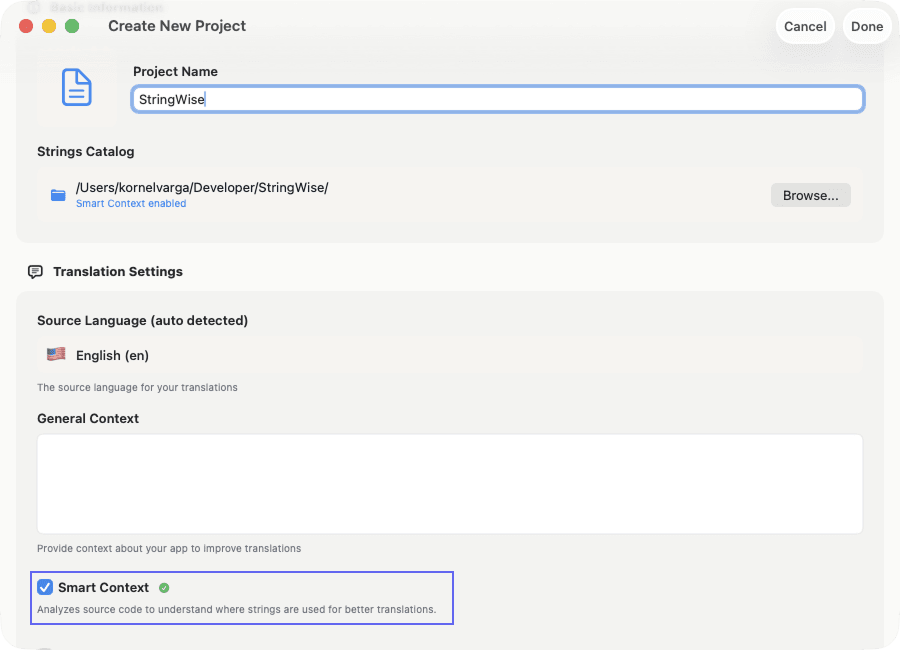
Step 2: Enable Smart Context
After importing, toggle Smart Context on in the settings panel. The first analysis may take 10-30 seconds depending on project size.
You'll see a confirmation that source files were scanned:
Smart Context: Enabled
Scanned 147 source files
Found 892 string references
Step 3: Add comments for ambiguous strings
For strings where code context alone isn't enough, add comments directly in Xcode's String Catalog editor:
- Select the string in your
.xcstringsfile - Add text to the Comment field
- Save the file
Comments you add in Xcode are used by StringWise as additional context:
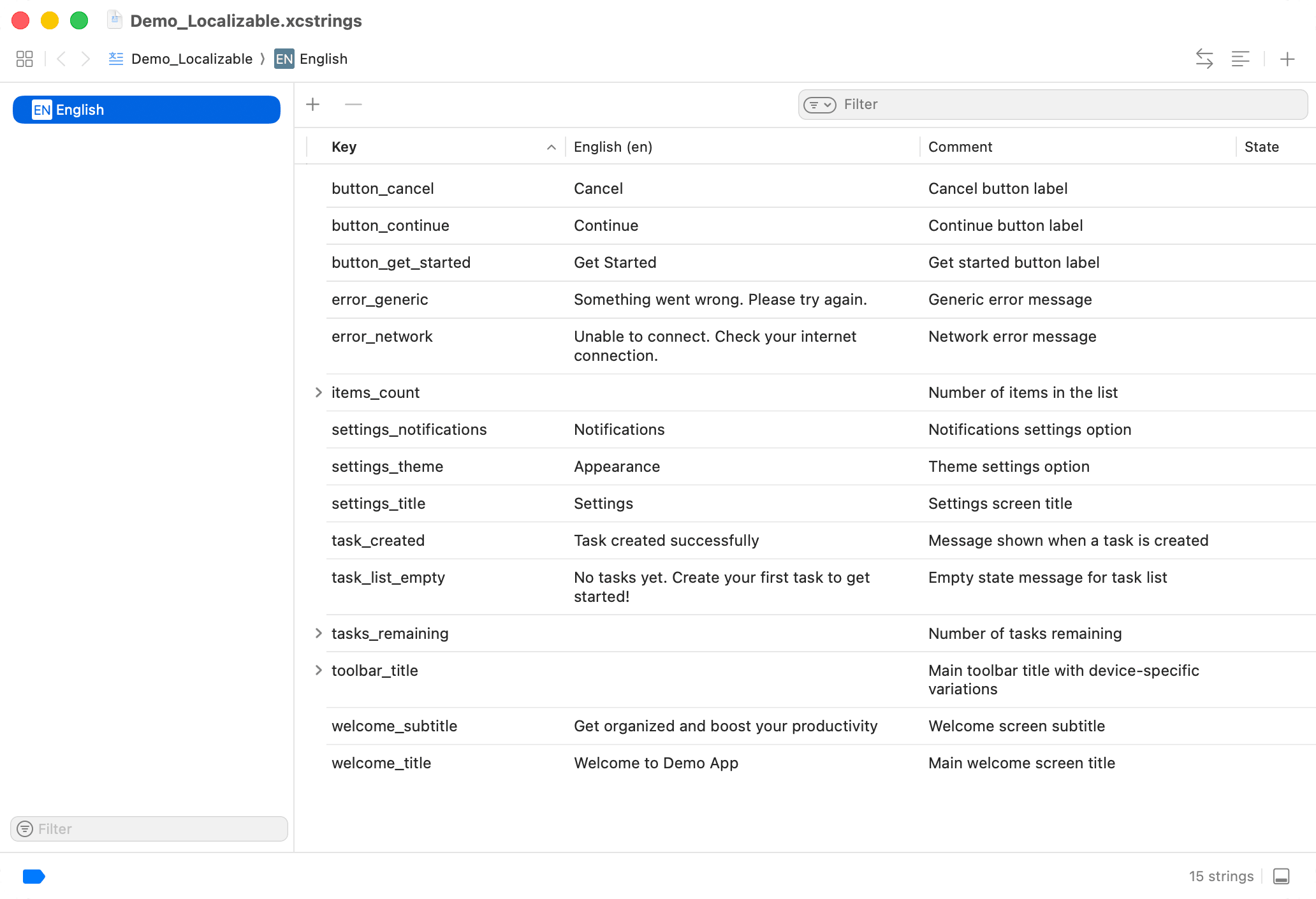
Good comments describe the purpose, not the content:
| String | ❌ Poor Comment | ✅ Good Comment |
|---|---|---|
| Save | "Save button" | "Saves document to cloud storage" |
| Check | "Check action" | "Toggle to enable daily reminders" |
| Post | "Post verb" | "Button to publish a new social post" |
Step 4: Review high-impact strings
After translation, check strings that matter most:
- Paywall and purchase flows — Incorrect translation here costs revenue
- Destructive actions — "Delete", "Remove", "Clear" must be unambiguous
- Navigation labels — Users need to understand where taps take them
- CTAs — "Start", "Continue", "Submit" should feel natural
Smart Context improves accuracy across the board, but human review remains valuable for strings with business impact.
When Context Isn't Enough
Smart Context handles most ambiguity, but some cases require manual attention:
Domain-specific terminology
If your app uses industry jargon that doesn't appear in general training data, add explicit comments. A medical app's "Check" might mean "medical examination" rather than "verify" or "enable."
Brand voice and tone
Context analysis determines meaning but not personality. If your app uses playful language, formal alternatives, or regional variants, specify this in comments or review translations manually.
Strings with no code reference
Strings that exist in your String Catalog but aren't referenced in code (perhaps from a deprecated feature) won't have context. These translate with standard model behavior.
Compound strings
Strings assembled from multiple parts at runtime lose context benefits. Prefer complete sentences over concatenation:
Avoid:
let message = String(localized: "Deleted") + " " + String(localized: "\(count) items")
Prefer:
let message = String(localized: "Deleted \(count) items")
Complete strings provide better context for translation and avoid grammatical errors across languages with different word orders.
Frequently asked questions
What is Smart Context in StringWise?
Smart Context is an on-device code analysis feature that scans your Swift and Objective-C source files to understand where each string appears in your UI. It identifies whether a string is used in a button, alert, menu item, or other element, then uses this information to improve translation accuracy.
Does Smart Context upload my source code?
No. Smart Context runs entirely on your Mac using Apple's on-device language models. Your source code is analyzed locally and never leaves your device. Only the string content with context descriptions is sent to translation APIs.
Which strings benefit most from code context?
Short, ambiguous strings benefit most. Words like "Save", "Share", "Post", "Check", or "Clear" have multiple meanings that only context can resolve. Longer sentences that already contain context ("Save your document to the cloud") benefit less but still gain some accuracy improvements.
Do I need to import my project folder to use Smart Context?
Yes. If you import only the .xcstrings file, StringWise has no source code to analyze. Import your project folder to enable Smart Context and get the full accuracy benefit.
Does Smart Context work offline?
The code analysis step runs entirely offline using on-device processing. The translation step still requires internet connectivity to reach translation APIs.
Try context-aware translation
Smart Context is available in StringWise for both free and Pro users. Import your project folder, enable the feature, and see how context transforms translation quality for your UI strings.
For a complete guide to the translation workflow, see How to Translate Xcode String Catalog Files with AI. For a comparison of AI vs manual translation approaches, see StringWise vs Manual Translation.
Ready to translate with context? Download StringWise and try the xcstrings translator workflow with your project.