
AI vs Manual Translation: Save 10+ Hours and $1,000+ Per Release
Manual translation costs $600-1,500 and takes 5-20 days. AI translation with StringWise: under 1 hour, $29.99/year. See the full comparison.
When comparing xcstrings translator options, the real question is not just speed — it's whether AI-powered translation can match the quality of manual workflows while eliminating days of waiting. For most iOS and macOS developers, the answer is yes.
This String Catalog translation tool comparison breaks down exactly where time goes in each approach, what hidden costs manual workflows carry, and when each method makes sense.
The Traditional Localization Workflow
Manual localization for Xcode String Catalogs typically follows this pattern:
-
Export localizations — Use Xcode's Product → Export Localizations to create
.xclocbundles (15-30 minutes including review of what's included) -
Prepare files for translators — Extract strings into spreadsheets or upload to a translation management system (30-60 minutes)
-
Send to translators and wait — Professional translators typically need 3-14 days depending on volume and language pairs
-
Receive and import — Download completed translations and use Product → Import Localizations (30-60 minutes)
-
QA and fix errors — Review for broken placeholders, missing plurals, and context errors (2-8 hours depending on string count)
-
Re-export if issues found — Send corrections back to translators and wait again (adds 2-5 days)
Total time for a typical 200-string app to 10 languages: 5-20 days elapsed, 4-12 hours of developer time per release.
Hidden Costs of Manual Translation
Beyond the obvious time investment, manual translation workflows carry costs that don't appear on invoices.
Context loss in handoff
When strings leave your Xcode project, they lose context. A translator seeing "Save" in a spreadsheet doesn't know if it's:
- A button label (guardar in Spanish)
- A financial term (ahorrar in Spanish)
- A rescue action (salvar in Spanish)
This ambiguity leads to incorrect translations that only surface during QA — or worse, after release.
Placeholder errors from non-technical translators
Format specifiers like %@, %d, and %1$@ look like typos to translators unfamiliar with iOS development. Common mistakes include:
- Removing placeholders entirely
- Changing
%@to@%or% @ - Dropping positional specifiers needed for word order differences
Each broken placeholder causes a runtime crash, making these errors critical.
Plural form mistakes
Arabic requires 6 plural forms. Russian requires 4. Polish has complex rules that trip up even native speakers. Most translators aren't familiar with CLDR plural categories and will provide incomplete or incorrect variations.
Coordination overhead
Managing translations across multiple freelancers or agencies requires:
- Version control for string files
- Tracking which strings changed between releases
- Ensuring terminology consistency across translators
- Handling disagreements about translation choices
This coordination tax grows with each language you add.
The AI-Assisted Workflow with StringWise
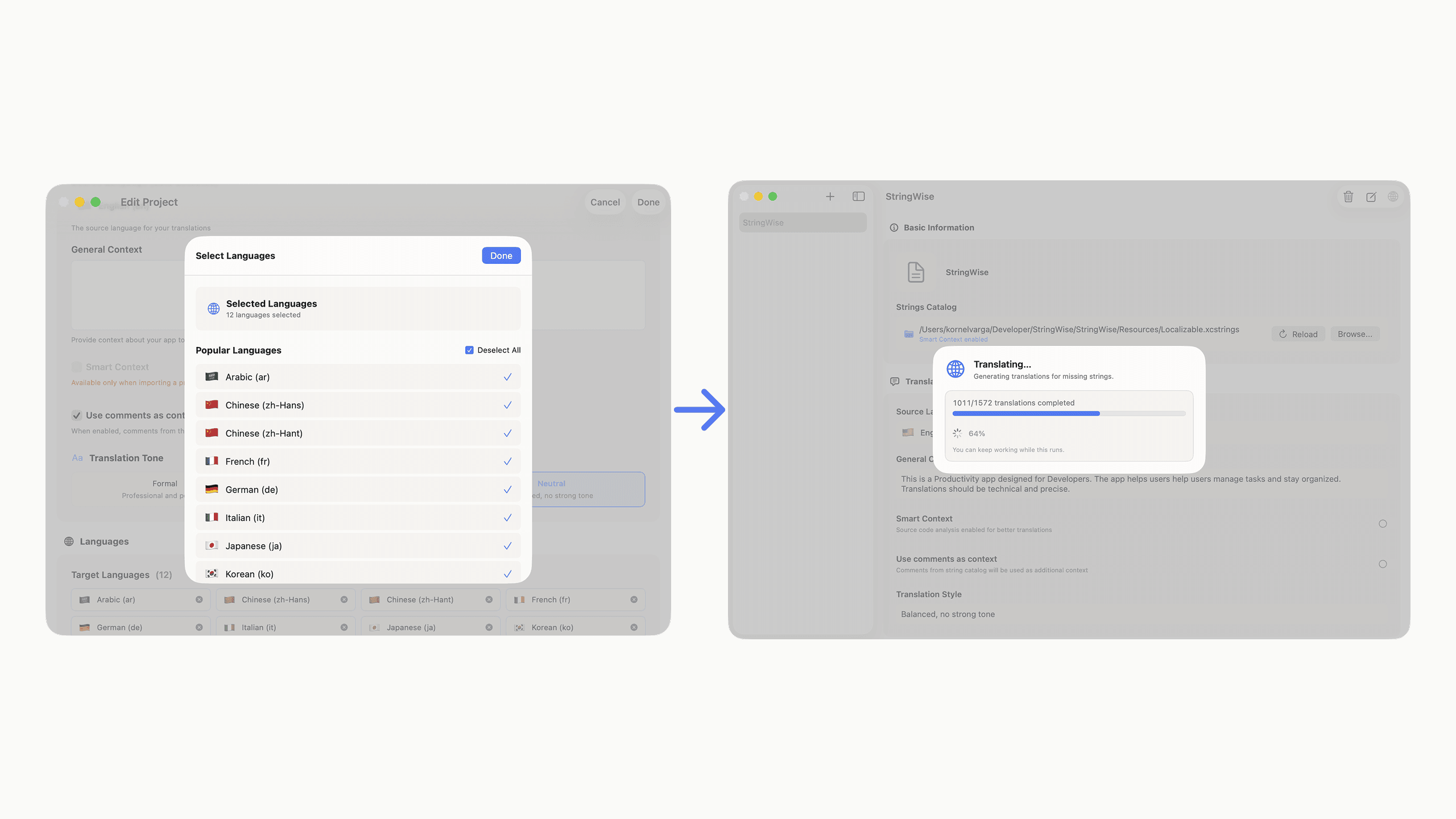
StringWise compresses the localization workflow into a single session:
-
Import your project — Select your Xcode project folder to enable Smart Context (30 seconds)
-
Configure languages and style — Choose target languages and translation tone (1 minute)
-
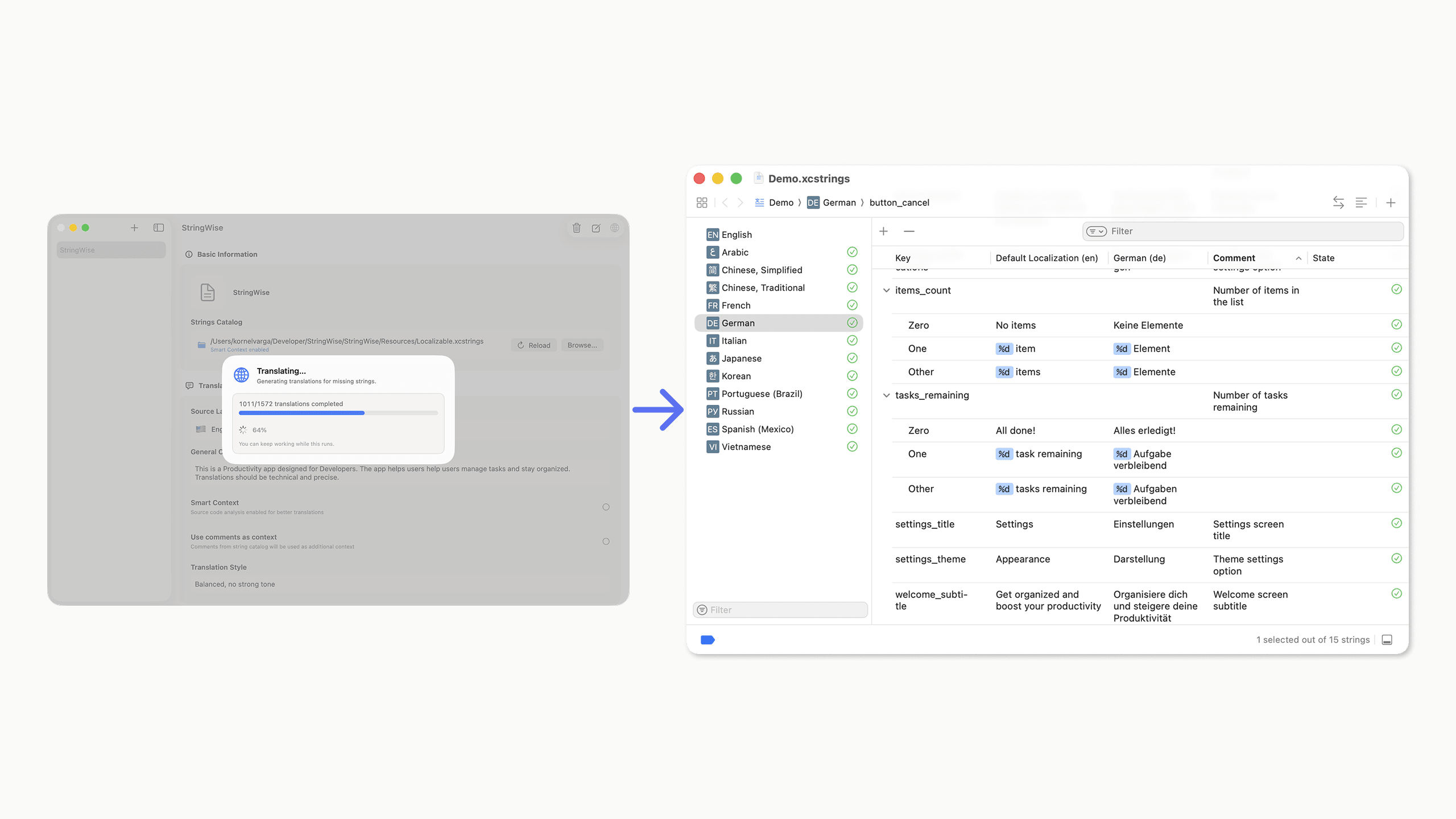
Translate — AI processes all strings with code context analysis (2-5 minutes for 200 strings)
-
Review results — Spot-check high-visibility strings, verify placeholder integrity (15-30 minutes)
-
Export to Xcode — Write the updated
.xcstringsfile back to your project (10 seconds)
Total time: 20-40 minutes, same day.
The key difference is that iteration happens in real-time. If a translation looks wrong, you can adjust and regenerate immediately rather than waiting days for a correction cycle.
Does AI Translation Quality Match Manual Translation?
The quality question is the most common concern. Here's what actually matters for app UI translation:
Smart Context changes the equation
Generic translation tools fail on short strings because they lack context. StringWise analyzes your source code to understand:
- Whether "Save" is a button, menu item, or document action
- What type of object a placeholder represents
- Whether the string appears in an alert, empty state, or settings screen
This context-aware approach eliminates the category of errors that make generic AI translation unreliable.
Language-specific model selection
Different AI models perform better for different language pairs. StringWise routes translations to models optimized for each target language rather than using a one-size-fits-all approach.
Where AI matches or exceeds human translation
For standard UI strings — button labels, status messages, error descriptions, settings options — AI translation with proper context produces results equivalent to professional translation. These strings follow predictable patterns and have clear functional meanings.
Where humans still add value
- Marketing copy — App Store descriptions, promotional text, taglines
- Legal content — Terms of service, privacy policies, compliance text
- Highly creative content — Onboarding flows with personality, playful error messages
For these categories, consider AI translation as a first draft that a professional refines, or maintain them separately from your String Catalog workflow.
When to Use Professional Translators vs AI
| Content Type | Recommendation | Reason |
|---|---|---|
| UI labels and buttons | AI with context | High volume, predictable patterns, context analysis solves ambiguity |
| Error messages | AI with context | Technical accuracy matters more than creative flair |
| Settings and preferences | AI with context | Functional strings with clear meanings |
| Onboarding copy | AI draft + human review | Balance between volume and brand voice |
| App Store description | Professional translator | Marketing impact justifies cost |
| Legal text | Professional translator | Liability concerns require human accountability |
The practical approach for most apps: use StringWise for your String Catalog (90%+ of strings), and maintain marketing/legal content separately with professional translation.
Time and Cost Comparison
Here's a realistic comparison for a typical indie app release:
| Factor | Manual Translation | StringWise |
|---|---|---|
| Strings | 200 | 200 |
| Languages | 10 | 10 |
| Elapsed time | 5-20 days | Under 1 hour |
| Developer time | 4-12 hours | 30-40 minutes |
| Per-release cost | $600-1,500 | $29.99/year* |
| Iteration speed | Days per correction | Minutes |
| Placeholder validation | Manual QA | Automatic |
| Plural form handling | Translator dependent | CLDR-compliant automatic |
*StringWise Pro pricing is $29.99/year or $9.99/month in the U.S. App Store. Prices may vary by region. A 3-day free trial is included.
For apps with frequent releases, the time savings compound. A monthly release cycle with manual translation means 60-240 days per year waiting on translations. With StringWise, that becomes 12 hours total.
The real cost of slow localization
Beyond direct translation costs, slow localization creates opportunity costs:
- Delayed feature releases — Waiting for translations holds back the entire release
- Stale translations — By the time translations arrive, the UI may have changed
- Reduced language coverage — The hassle of managing translations discourages adding new languages
When translation takes minutes instead of weeks, you're more likely to ship all 24 App Store languages rather than limiting yourself to the "essential" 5-6.
Frequently asked questions
Is AI translation good enough for production apps?
For UI strings in apps, AI translation with proper context produces production-ready results. StringWise uses Smart Context to analyze your code and understand where each string appears, which eliminates the ambiguity problems that plague generic translation tools.
How much does manual translation cost compared to AI?
Professional translation typically costs $0.10-0.25 per word. For a 200-string app translated to 10 languages, that's $600-1,500 per release. StringWise Pro costs a fraction of that and works instantly for every update.
Will I still need professional translators?
For marketing copy, legal text, or highly creative content, professional translators add value. For standard UI strings, button labels, and error messages, AI translation with context analysis matches or exceeds typical freelance quality.
How does StringWise handle languages I don't speak?
StringWise validates technical correctness (placeholders, plural forms, format specifiers) automatically. For content review, many developers use native-speaking beta testers or the app's user community to spot-check translations.
Start saving hours on every release
Ready to cut your localization time from days to minutes? Download StringWise and try the xcstrings translator workflow. Import your project, select your languages, and have production-ready translations before your next meeting.
For a detailed walkthrough of the translation process, see How to Translate Xcode String Catalog Files with AI. Before shipping, run through the String Catalog QA Checklist to catch any edge cases.